

I spent the first six months in my home office thinking the headaches were just part of getting older. Sixty-three years old, retired from thirty years of finish carpentry, and suddenly I was sitting at a desk for four or five hours a day instead of on my feet in a shop. By two in the afternoon my eyes felt like I had been staring into a heat lamp. Turned out I had been, in a way. A single overhead light fixture directly above my monitor, a south-facing window behind my left shoulder, and a cheap clip lamp aimed straight at my screen. That combination will wreck your eyes faster than you think.
Fixing it was not complicated once I understood what I was actually doing wrong. Good home office lighting comes down to five things: where your desk sits relative to your windows, how you layer ambient and task light, where your task lamp is positioned, what color temperature you choose, and why a single overhead bulb is never enough on its own. Work through these five steps in order and the glare problem mostly solves itself. I will also tell you what I use for task lighting and why it made a real difference after I replaced my old clip lamp with it.
Tired of squinting at your screen by noon? A proper task lamp is the fastest fix.
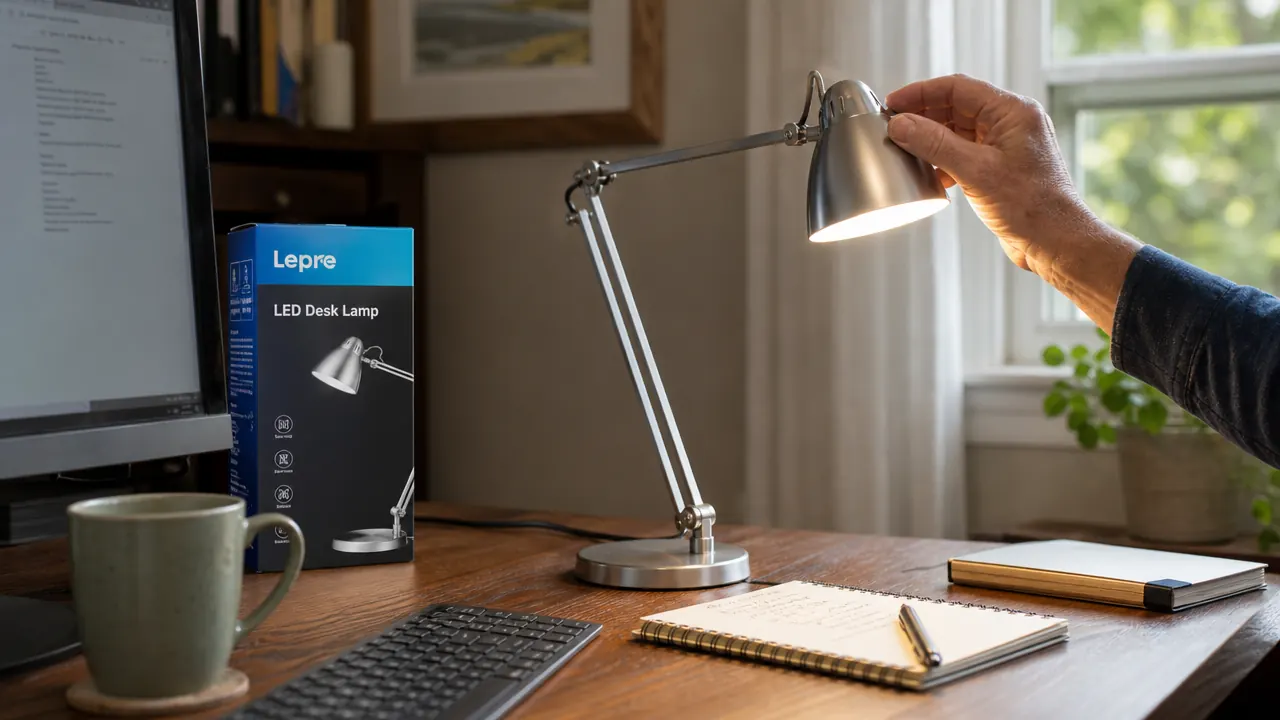
The Lepro LED Desk Lamp gives you five color temperatures, five brightness levels, and a metal arm that holds its angle all day. Rated 4.8 stars across more than 8,000 reviews and vetted by Forbes as a best task lamp. Under $30.
Amazon Check Today's Price on Amazon →Step 1: Position Your Desk Perpendicular to the Window
Before you touch a single light switch, look at where your desk is sitting relative to your windows. This is the single biggest factor in whether you will have screen glare, and most people get it wrong. The two setups that cause the most trouble are sitting with a window directly behind you and sitting with a window directly in front of you. Behind you means the light bounces off your screen like a mirror. In front of you means you are fighting the brightness contrast all day, and your monitor looks washed out.
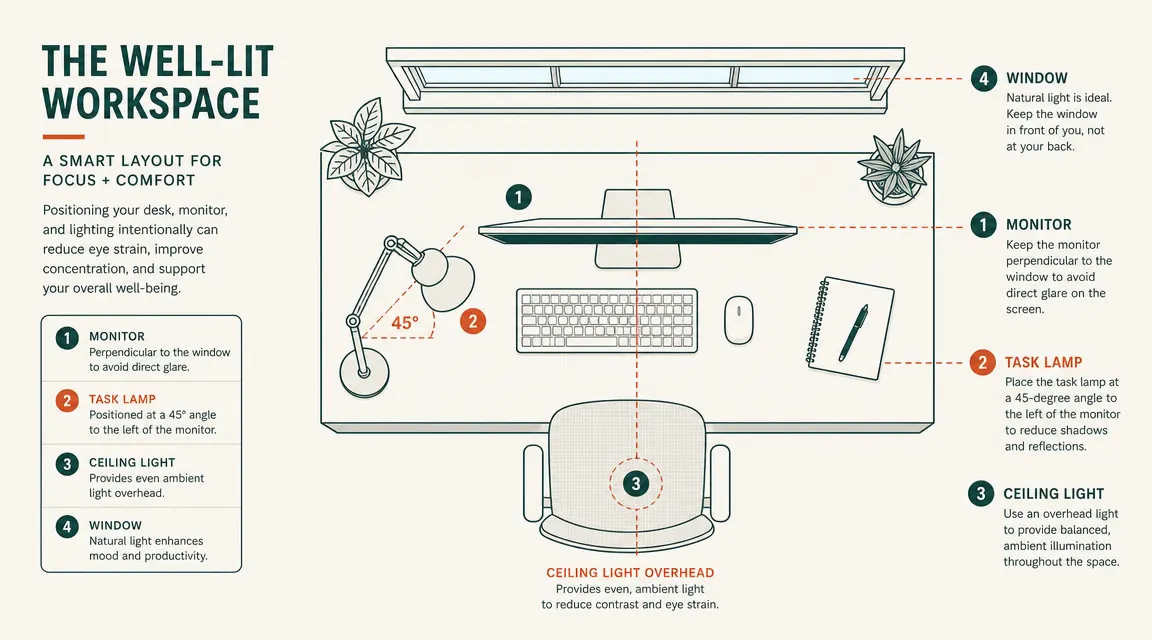
The fix is to place your desk so the window is to your side, ideally at a 90-degree angle to your line of sight. Left side works better for most right-handed people because your writing hand casts less shadow on the keyboard. If your room only allows a window behind or in front of you, hang a sheer curtain or frosted window film. You do not need to block all the daylight, just diffuse it so it stops being a direct light source bouncing into your eyes or your screen. I put up a simple white linen curtain in my office for about eight dollars and it cut my afternoon glare problem in half before I even changed a single lamp.
One more thing on window position: if you have a dual-monitor setup, the perpendicular rule matters even more. Two screens give you twice the reflective surface area. Position both monitors so neither one is facing the window directly. Angling them slightly away from the window rather than flat-on to the wall can help catch the ambient light without catching the direct glare.
Step 2: Layer Ambient Light and Task Light Instead of Relying on One Source
Here is the part most people skip entirely: you need at least two types of light working at the same time. Ambient light is the general room brightness, usually your ceiling fixture or a floor lamp in the corner. Task light is the focused lamp aimed at your work surface. Running only your ceiling light and nothing else is like working in a warehouse. Running only a desk lamp with everything else dark is like working in a cave with one candle. Both extremes make your eyes work harder than they should.
The goal is what lighting designers call balanced illumination. Your task light should be roughly three times brighter than your ambient light at the work surface. That sounds technical but in practice it just means: keep your overhead or background light at a medium brightness, then add a desk lamp to bring up the light level right where you are working. Your eyes adjust to the average brightness in your field of view. When that average is consistent, you stop squinting and stop straining to read.
A simple floor lamp with a warm bulb in the back corner of the room does the job for ambient. If you have a ceiling fixture, put it on a dimmer if you can. The idea is that your office should not go pitch black when you turn off the desk lamp, and it should not feel like an interrogation room when the overhead is the only thing on. Once you have both layers working, the adjustment when you look from your screen to your notebook and back again gets much easier on your eyes.
Step 3: Place Your Task Lamp at the Correct Angle and Distance
This is where most people who do own a desk lamp still get it wrong. They put the lamp directly behind the monitor or directly to the right of the keyboard and wonder why they still have glare. The lamp position that causes the least trouble is off to your non-dominant side, a few inches behind the front edge of your desk, with the head angled down toward the surface of the desk rather than toward the screen.
Think about it the way a carpenter thinks about a work light over a bench. You want the light on the work, not on the tool you are using to do the work. Your screen is the tool. Your keyboard, your notebook, your hands are the work surface. Aim the lamp at those, and tilt the head so the beam stops before it reaches your monitor. A lamp with an articulating arm, meaning one you can pivot at the base and again at the neck, lets you dial this in precisely. Fixed-angle lamps almost never hit the sweet spot without a lot of stacking books under the base.
Distance matters too. The Lepro lamp I use has a standard arm reach of about 14 inches from the base. I keep the base roughly 12 inches to the left of my keyboard and the head angled about 30 degrees down toward the desk surface. At that distance and 800 lumens on a medium brightness setting, the keyboard and notepad are well-lit and the screen shows no visible hotspot or glare from the lamp. If you notice a bright reflection of the lamp in your screen when you sit back, tilt the lamp head down another 5 to 10 degrees. That usually resolves it.

Step 4: Choose the Right Color Temperature for the Time of Day
Color temperature is measured in Kelvin. Lower numbers, around 2700K to 3000K, produce warm yellow light. Higher numbers, around 5000K to 6500K, produce cool blue-white light. Both are useful, but at the wrong time of day either one will make your eyes work harder. Cool blue light in the evening interferes with your body's wind-down signals and makes you feel wired when you should be slowing down. Warm yellow light during focused morning work can feel dim and sleepy when you need to be alert.
The practical approach is to use a cooler white light in the morning for focused work, somewhere in the 4000K to 4500K range, and switch to a warmer setting in the late afternoon and evening, around 3000K. A lamp with multiple color modes means you do not need a different lamp for different times of day. The Lepro desk lamp has five modes: warm, warm white, natural, cool white, and white. I use the natural setting, which sits around 4000K, for most of the morning, and drop down to warm white in the late afternoon when the day is winding down. It is a small thing but it makes a real difference in how I feel at five o'clock.
One note on matching your lamp color to your monitor: most monitors default to a slightly cool white at factory settings. If your lamp is much warmer than your screen, your eyes will keep adjusting as they shift between the two. Try to get your lamp and your monitor to a similar color temperature. Most monitors have a color temperature setting in their on-screen menu. Matching them to within about 500K of each other reduces the visual strain from looking back and forth.
Step 5: Get Rid of the Single Overhead Light as Your Only Source
This is the step that gets skipped most often because it involves changing something most people consider fixed. The single overhead ceiling light is usually the first and last thing people think about when they set up a home office. Flip the switch, room is bright, done. The problem is that a single overhead source creates a harsh downward light with strong shadows, and if it is directly above your monitor, it bounces light off the top bezel straight into your eyes.
You do not have to rewire your house to fix this. The simplest move is to swap the overhead bulb for a bulb in the 3000K to 4000K range at a lower wattage than you might think you need. Then add your layered task light as described above. The overhead becomes background fill. It keeps the room from feeling dark and prevents the eye-strain that comes from a bright screen in a dark room, but it stops being your primary work light. A $12 smart bulb that you can dim from your phone makes this even easier. You do not need a smart home system for it to be useful.
If you cannot change your overhead setup at all, a secondary lamp on a credenza or shelf behind and above you, aimed at the ceiling rather than directly at you, can bounce light into the room as ambient fill without creating any direct glare. Lighting designers call this uplighting. It is cheap, it works, and it gives your room a much more settled and even look than a single harsh ceiling can.
What Else Helps
Once you have the five steps in place, a few smaller things push the setup the rest of the way. A matte screen protector or a matte monitor finish eliminates a lot of residual glare that lighting alone cannot address. Keeping your monitor at arm's length and tilted back about 10 to 15 degrees reduces both glare angle and neck strain. If you are running two monitors, keep the brightness settings matched between them because the eye-strain from constantly adjusting to different brightness levels adds up over a long day. And if you find yourself still getting headaches, check whether your cheap ceiling bulb is flickering at 60Hz. Many inexpensive LED bulbs do this invisibly, and it shows up as fatigue after a few hours even when you cannot consciously see the flicker. Replacing a $4 flickering LED with a quality one at the same wattage has fixed more home office headaches than any amount of lamp repositioning.
By two in the afternoon my eyes felt like I had been staring into a heat lamp. It was not age. It was bad lamp placement, the wrong color temperature, and a window I had not thought about.
If you only make one change, make it the task lamp.
The Lepro LED Desk Lamp is the one I use daily. Metal build, five color temperatures, five brightness levels, and a fully articulating arm that holds its position without drooping. Forbes vetted it. More than 8,000 people gave it 4.8 stars. The price is modest enough that it is not a gamble. If the lamp does not fix your glare problem, you still have a well-made light for your desk.
Amazon Check Today's Price on Amazon →