

The back of my desk looked like a rat's nest for two years. Seven cords running in seven directions, a cheap six-dollar power strip from the hardware store, and no real idea which outlet was pulling how much. When my desktop went to standby, the lamp stayed on. When I left for the weekend, the monitor stayed warm. It was the kind of setup that quietly drives up your electric bill and quietly drives you a little crazy. I picked up the Kasa HS300 smart plug strip about fourteen months ago, mostly because I wanted to be able to turn off the monitor without reaching behind it. What I got was a fair bit more than that.
The HS300 gives you six individually controlled outlets and three USB charging ports, all managed from a phone app or a voice command. It costs about forty dollars. That is less than I spent on a single piece of hardware last year and more useful than most of them. Here is what fourteen months of daily use in a real home office actually looks like.
The Quick Verdict
A well-built smart strip that does exactly what it promises. The per-outlet control and energy monitoring are genuinely useful for a home office. The app is reliable. The USB ports are beginning to show their age with faster devices, but the core product holds up.
Amazon Check Today's Price →Stop paying for gear that never turns off. The HS300 lets you control every outlet on your desk from your phone.
Six individually scheduled smart outlets, built-in energy monitoring, and Alexa and Google Home support. No hub required.
Amazon Check Today's Price on Amazon →How I Have Used It for Fourteen Months
My desk runs a 27-inch monitor, a desktop tower, the Lepro LED task lamp I reviewed separately, a small oscillating fan, and whatever phone or tablet needs charging that day. Before the HS300, everything was on one dumb strip. Everything came on together, everything stayed on together.
I set up the HS300 in about fifteen minutes. Downloaded the Kasa app, plugged in the strip, connected it to my 2.4 GHz Wi-Fi, and named each outlet from the app. I called them Monitor, Desktop, Lamp, Fan, and Spare. The sixth outlet I left labeled exactly that. Each outlet got its own schedule: the monitor and lamp go on at 8 AM and off at 7 PM. The fan runs noon to 5 PM in summer. The desktop I leave on manual because I power that one myself. It sounds like more setup than it is. Once you name the outlets in the app, the voice commands work right away. I say 'Alexa, turn off the monitor' and it goes off. That alone was worth the purchase price.
I never had to touch the physical strip again after initial setup. It sits on the back edge of my desk surface, cords routed down through a grommet I drilled years ago, and it just runs. That is what you want from a piece of infrastructure. You set it up right and forget about it.
Build Quality: What You Are Actually Holding
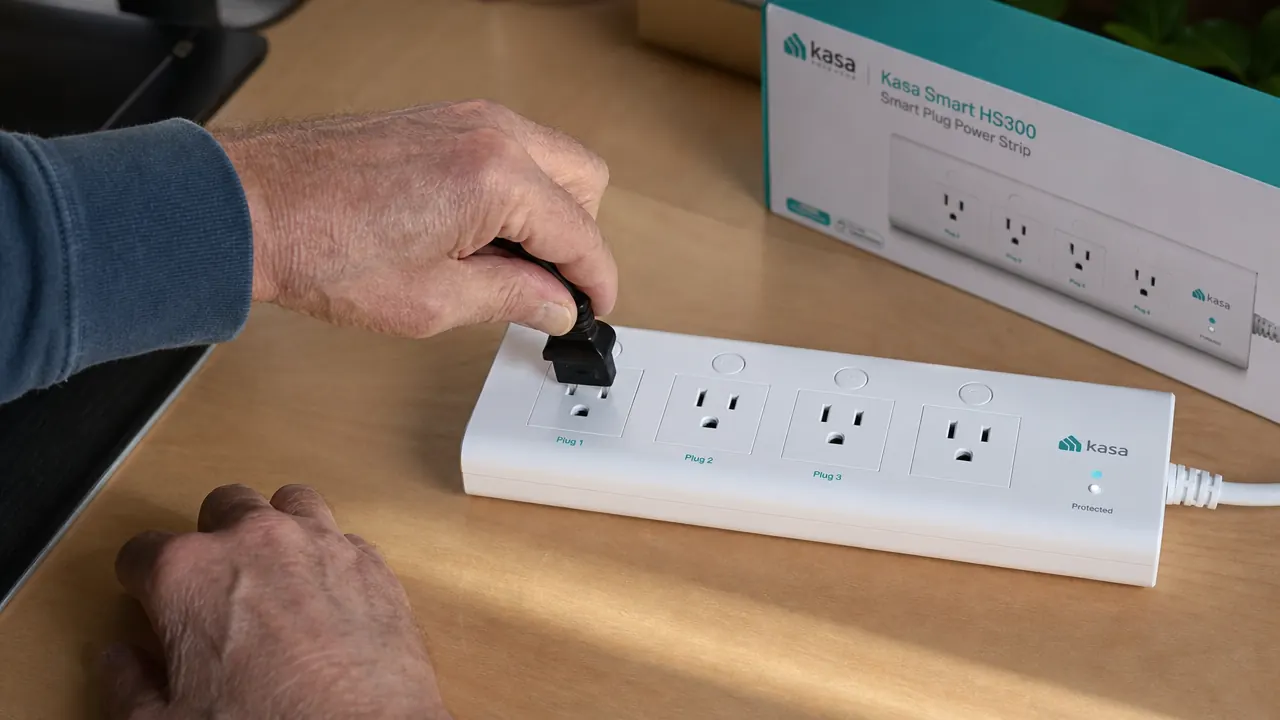
I spent thirty years as a carpenter. I handle things before I trust them. The HS300 is a solid piece of plastic, which is what a power strip should be. The housing is fire-retardant ABS, the outlet slots are well-spaced, and the power cord is five feet long with a straight plug, not angled. That matters. I have seen strips with right-angle plugs that could not fit behind a desk without forcing the outlet housing away from the wall. This one sits flat. The surge protection rating is 4000 joules. That is a real number for real protection, not the 900-joule rating you see on bargain strips.
The six outlets are arranged in two rows of three. Each one has a small status light that shows whether it is on. They are spaced far enough apart that most standard plugs fit without blocking adjacent outlets, though a large wall-wart adapter on the far end will likely block the last slot. I have one transformer plug on mine and I put it in the end position on purpose to avoid exactly that. If you are plugging in several large adapters, plan your layout before you commit.
The three USB ports on the right end are USB-A, rated at 2.4 amps total shared across all three. In 2019 that was plenty. In 2025 it is a mild limitation. If you are charging a modern iPad at full speed while also topping off a phone, you will see slower charge times. For a phone, a Bluetooth headset, and a small tablet, they work fine. Do not expect USB-C Power Delivery speed out of these ports. That is not what this strip was designed for.
The App and the Voice Control: What Works and What Does Not
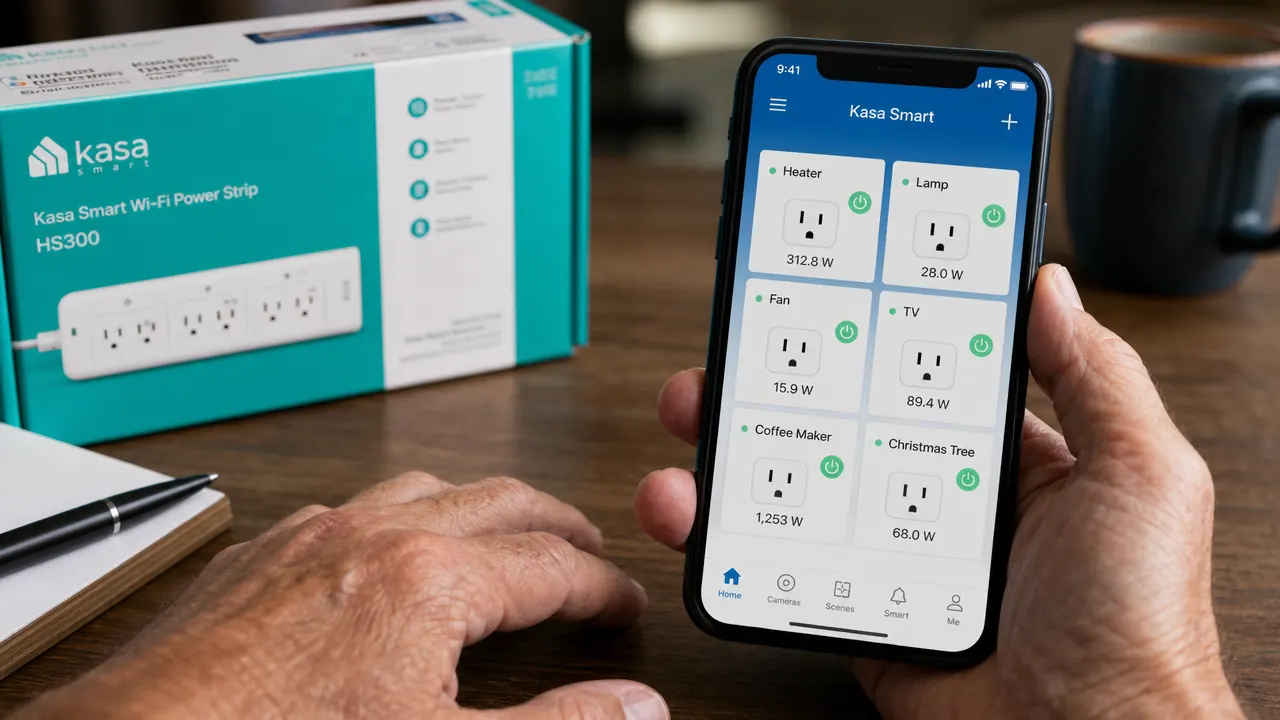
The Kasa app is one of the better smart-home apps I have used, and I have tried several. The interface is straightforward. Each outlet shows its current state, current wattage draw, and has a button to toggle it. You can set schedules, create groups, and set away mode routines that toggle outlets on and off at random to make the house look occupied. I do not use the away mode, but I appreciate that somebody thought of it.
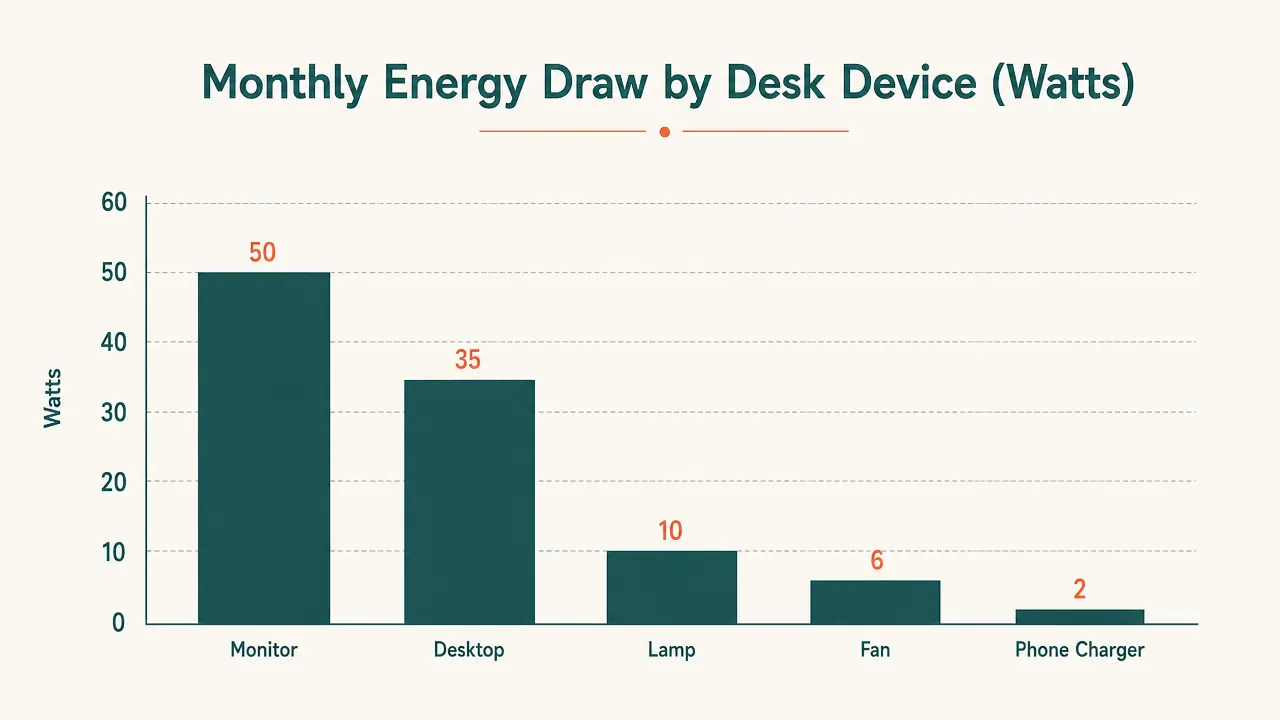
The energy monitoring is the feature I did not expect to use and ended up relying on. Each outlet logs its power draw in real time and saves usage history. I found out my old desk fan was pulling 80 watts on high, which surprised me. My monitor draws 38 watts in use and 4 watts on standby, which means leaving it on standby all night costs me almost nothing but I turned it off anyway out of principle. The desktop idles at about 120 watts. The lamp draws 9.5 watts, exactly what the spec sheet says. Seeing these numbers confirmed that my biggest phantom load was a device I had forgotten about: an old inkjet printer plugged into the spare outlet that I almost never print from. I put that outlet on a manual schedule and stopped powering the printer until I need it.
I found out my old desk fan was pulling 80 watts on high. Seeing your actual usage numbers changes how you manage gear. That is worth forty dollars on its own.
Alexa and Google Home integration works without a hub. You connect your Kasa account in the Alexa or Google Home app and the outlets show up as smart devices. I use Alexa because I already had an Echo Dot in the office. Voice control response time is fast, typically under two seconds. In fourteen months I have had two instances where a voice command did not execute, and both times a second request went through immediately. I did not lose sleep over it.
The only app gripe worth mentioning: Kasa occasionally pushes an app update that requires you to log back in. It has happened three times in fourteen months. Not a crisis, but mildly annoying when you want to turn something off from the couch and the app is asking for your password. Keep your login credentials somewhere accessible.
Scheduling: The Feature That Earns Its Keep Daily
Scheduling is where the HS300 earns most of its value in a home office. A dumb strip means you turn things on when you start and turn them off when you remember. A smart strip means your workspace is ready when you arrive and dark when you are done, without thinking about it. My morning routine is simple now. I walk to my desk, sit down, and everything I need is already on. The monitor is lit, the lamp is at warm white, the fan is off until noon. When I stop for the day, I say 'Alexa, goodnight office' and a scene I built in the Alexa app turns off the monitor, lamp, and fan in one command.
You can set schedules based on time of day, sunrise and sunset, or repeat on specific days of the week. I run a different fan schedule on weekends than I do during the week. It takes four taps to set up. The schedules store on the strip itself, not just in the app, so if your Wi-Fi goes down the scheduled on and off cycles still run. That was important to me. I do not want gear that stops working the moment the router reboots.
Performance Over Time: Any Drift, Any Failures
In fourteen months of daily use, I have had zero outlet failures and zero Wi-Fi drop-outs that the strip did not recover from on its own. The unit has never gotten warm to the touch under normal desk load. I am running it at about 55 to 60 percent of its rated capacity, which is where you want to run any electrical device if you want it to last. I would not max out all six outlets simultaneously for extended periods. That is true of any surge strip.
The status lights on each outlet have not dimmed or flickered. The plastic housing has no discoloration. The five-foot cord shows no wear at the plug or at the strip entry. This is a product built to sit in one place and run quietly for years. It appears to be doing that.
What I Liked
- Six individually controlled outlets, each with its own schedule and on/off toggle
- Real energy monitoring per outlet, not just total strip draw
- Schedules stored on the device, so they run even when Wi-Fi is down
- Works with Alexa and Google Home without a separate hub
- 4000-joule surge protection rating, well above budget-strip levels
- Kasa app is clean and responsive, firmware updates have not broken functionality
- Five-foot cord with a straight plug fits desks without forcing the outlet housing
Where It Falls Short
- USB-A ports only, no USB-C, and 2.4A shared across three ports is limiting for modern devices
- 2.4 GHz Wi-Fi only, no 5 GHz support, common for smart home gear but worth knowing
- Large wall-wart adapters can block adjacent outlets if you do not plan placement
- App login required after some updates, minor but recurring annoyance
Alternatives I Considered Before Buying
Before the HS300 I looked at two other options. The Tapo P300, also from TP-Link, is the newer sibling to the Kasa line. It is a bit cheaper and has a more compact form factor. It does not have per-outlet energy monitoring at the same level and its app is separate from the Kasa ecosystem. If you are already invested in Kasa devices, the HS300 integrates cleanly. If you are starting fresh, the Tapo P300 is worth comparing. I cover that head to head in the Kasa HS300 vs. Tapo P300 comparison article.
I also considered a basic smart outlet adapter on each individual plug, which would have let me keep my existing strip. The problem is that individual adapters add bulk at each outlet, and most do not include energy monitoring at the granular level the HS300 offers. For a desk where six devices are running off one strip, replacing the whole strip with a smart one is cleaner, cheaper, and simpler to manage. If you want to go deeper into setting up schedules and automations for the whole desk, I walk through that step by step in the home office smart plug automation guide.

Who This Is For
The HS300 is built for someone who runs several devices off one desk and wants individual control over them without reaching behind the monitor every time. Remote workers, freelancers, anyone who has a real home office with a handful of devices plugged in nearby. If you have been leaving your monitor on standby all night and wondering what it costs, this strip will tell you. If you want your workspace to turn on automatically in the morning without flipping switches, this does it. If you want to tell Alexa to shut down your desk without leaving your chair, this handles that too. The forty-dollar price is not a splurge. It is about two months of phantom power draw on most home office setups, and you will recover it.
Who Should Skip It
If you only have two or three things plugged in and do not care when they are on, a basic surge strip is all you need. The HS300 rewards people who have a full desk setup and want it managed. It also rewards people who are already in the Alexa or Google Home ecosystem. If your home runs no smart devices and you are not interested in the app at all, you are paying for features you will not use. Similarly, if you need USB-C fast charging at your desk, add a dedicated USB-C charging brick rather than relying on this strip's USB ports. That is an honest limitation and it matters if you charge newer tablets and laptops at the desk.
Fourteen months in, I would buy this again without hesitating.
The Kasa HS300 does exactly what it promises. Six smart outlets, real energy monitoring, reliable scheduling, and it works with Alexa and Google Home out of the box. At current pricing it is one of the better values on a home office desk.
Amazon Check Today's Price on Amazon →