

Most reviews for the Lepro LED desk lamp tell you it is well-made and the dimmer works. That is true. What they do not tell you is that the arm joint behaves oddly out of the box, that lux output drops faster than expected as you move the head back from the task surface, that the no-memory startup is a daily annoyance if you have a preferred setting, and that the power cable is about six inches shorter than what you need on a deep desk pushed against a wall. None of these things made me return the lamp. But they made me wish someone had said them plainly first.
The Lepro is a 9.5-watt, 800-lumen metal task lamp with five color temperature steps and five brightness levels, available for under $30. I am Dan, a retired carpenter. I built my home office by hand, so I pay close attention to how things are assembled and I notice when a joint is right versus just good enough. The Lepro is mostly right. Here is the full picture.
The Quick Verdict
A genuinely well-made metal task lamp that earns its price, but the arm joint stiffness, short cable, and no-memory reset are real inconveniences nobody mentions in the star ratings. Buy it knowing those tradeoffs, not in spite of them.
Amazon Check Today's Price →If your eyes are done by 3 PM, the problem is almost certainly your lamp. This one is under $30.
The Lepro runs five real color temperature modes on a metal arm that holds its angle. It is the best-built task lamp in this price range. Check the current price on Amazon before you buy something cheaper.
Amazon Check Today's Price on Amazon →How I Tested and Used It
My desk is a solid-wood workbench I converted into an office desk, 30 inches deep and 72 inches wide, pushed against the east wall of my spare room. I set the Lepro at the rear left corner with the arm extended forward and angled roughly 35 degrees down toward the keyboard. I ran it four to seven hours a day, six days a week, from late fall through spring. That covered morning work with no natural light, midday sessions with the window behind me, and evening sessions in near-complete darkness.
I tested the color modes by taping paint swatches of my office wall color, a warm greige, to the desktop and switching through all five temperature settings. I measured lux output at six, 12, and 18 inches using a phone light-meter app, which is not a laboratory instrument but gives a consistent relative comparison. I also tested the dimmer for flicker at every brightness step, because low-brightness flicker is the silent cause behind more eye fatigue than most people realize.
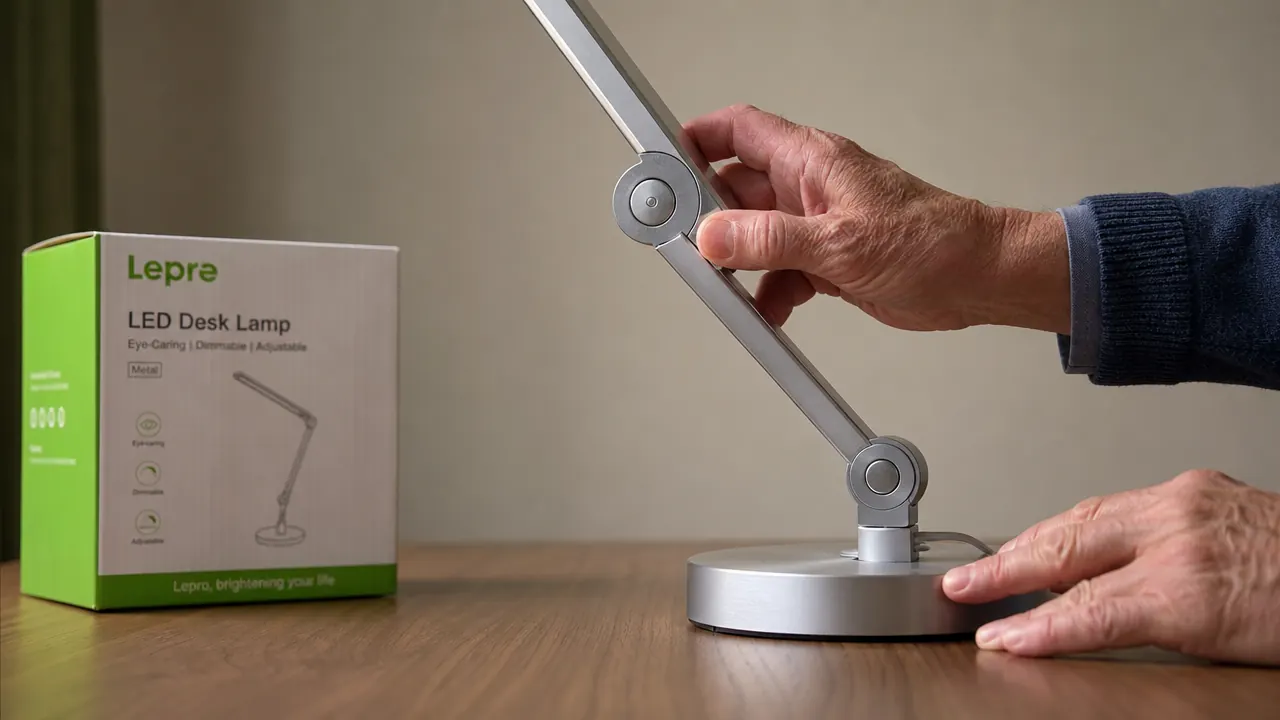
The Arm Joint: What Is Actually Going On
The arm has two pivot points: a lower joint where the arm connects to the base, and an upper joint, the elbow, roughly mid-arm. The elbow is the one that confuses new owners. It is noticeably stiffer than the lower joint out of the box, and when you try to fold or extend it, it resists in a way that feels like something is wrong. You push and nothing moves. You push harder and it snaps into position. That is not a defect. That is a friction-fitted hinge with a threshold, and it is there by design.
A spring-loaded hinge would drift down over a long work session. A friction hinge holds the angle you set without creeping. The tradeoff is that initial resistance. After a few weeks of regular use the threshold softens and the joint moves predictably. If your elbow joint feels like it might break, it will not. Push through it deliberately a few times and it will settle. That is not a reassuring thing to discover on your own, and the instruction sheet does not mention it.
The lower joint, where arm meets base, is smooth from day one. It pivots horizontally and sets the lamp reach across the desk without any tendency to rotate back under the head weight. The head joint, where the lamp head connects to the upper arm, is the loosest of the three. It holds a position during normal work, but if you bump the desk the head will tilt. At this price point that is a reasonable tradeoff, not a complaint, but worth knowing if precise lighting angle matters to your work.
Lux Output at Working Distance: The Number That Actually Matters
800 lumens is the spec. What reaches the task surface depends on how far you have placed the head. At 12 inches, the measured lux was roughly 700 to 750 on the highest setting. At 18 inches, a realistic position with the base at the back of a deep desk, it dropped to 400 to 450 lux. Recommended task lighting for office work runs from 300 to 500 lux, so even at 18 inches on full brightness the Lepro is at the upper end of that range.
The practical point: on mid-brightness at 18 inches you land around 200 to 250 lux, which is adequate for computer work but thin for reading fine print or close detail tasks. For reading or hand work, pull the head to 10 to 14 inches. For computer-only work, 16 to 20 inches is comfortable. The lamp has plenty of output, but the output falls off at distance the way any focused task light does.
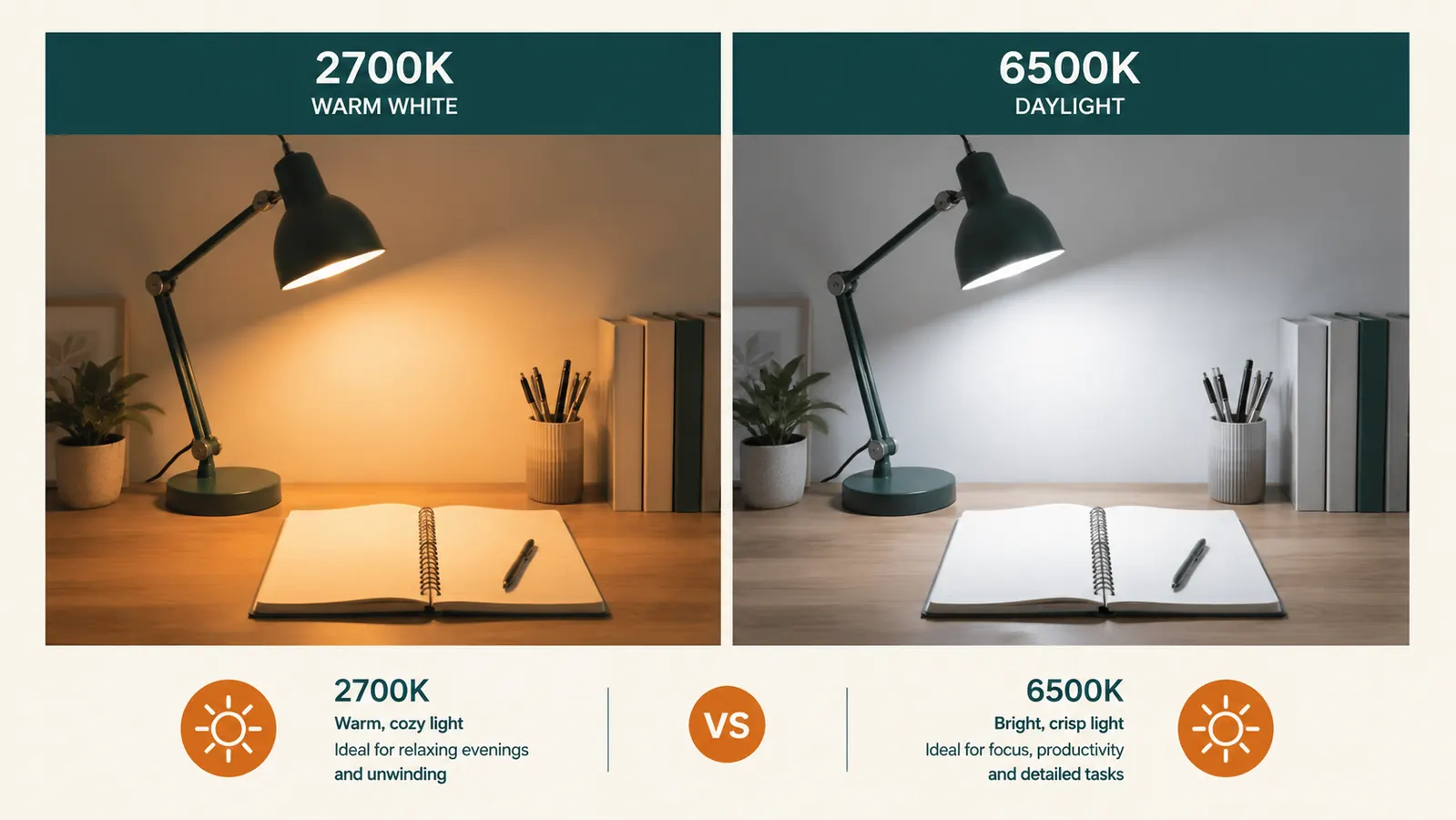
The Five Color Modes Against a Real Room
Most lamp reviews test color modes against a white backdrop. My office walls are a warm greige, close to Benjamin Moore Pale Oak. Color temperature does not perform the same way in a white room as it does in a warm-toned room, and those differences matter if you are trying to pick a lamp for your actual space.
The 2700K warm white works well with the wall color. The two warm tones sit together comfortably and the room feels settled. The 4000K neutral white is where I do most active work. Against the greige it reads as a clean, slightly warm neutral rather than the harsh clinical white of a commercial office. The 6500K cool daylight is stark against the warm wall, noticeably so at night. For daytime detail work it is useful. For evening work in a warm-toned room, it fights the space. None of this is a fault of the lamp. It is how color temperature behaves in practice, and having five steps lets you find the one that fits your room.
Color temperature does not happen in isolation. The 6500K mode that looks clean on a white desk reads stark and cold against a warm greige wall at night. The Lepro gives you enough range to find the setting that actually fits your room.
Dimmer Behavior and Flicker: Why This Matters More Than Brightness
LED lamps dim by cycling power on and off rapidly, a method called PWM. At high frequencies the human eye cannot detect it. At lower frequencies, common in cheap lamps on the dim settings, your eyes register a subliminal fatigue over hours even when you cannot consciously see any flicker. I tested the Lepro dimmer at all five brightness steps by filming it in slow-motion video mode on my phone, which reveals PWM banding that is invisible at normal speed. At every level I saw no visible banding. The dimming appears to use a high-frequency or current-reduction method rather than low-frequency PWM. Whatever the engineering, the result is steady, non-flickering output from step one through step five. For a lamp under $30, that is not guaranteed, and the Lepro gets it right.
The No-Memory Startup and the Cable Length
Every time the Lepro powers off and back on, it starts at 4000K neutral white at middle brightness. If that is your preferred setting, convenient. If your preferred setting is 2700K warm white at 40 percent for evening work, you will press two buttons every single startup. Three seconds each time. Over months of daily use, small friction like that does accumulate, especially if you sit down to work before your eyes have adjusted to the room and have to scroll through modes before you can see clearly. Some lamps in this price range remember the last-used setting. The Lepro does not. Know that going in.
The power cable is 59 inches, just under five feet. On most setups, adequate. On a deep desk pushed against a wall with an outlet at baseboard level, it falls about six inches short. I had to route mine through a cable channel under the desk and loop it to a side-wall outlet. A minor workaround, but I would have preferred 66 inches. If your outlet is beside or below the desk rather than behind it, this is not a problem.
The Placement Mistake That Defeats the Lamp
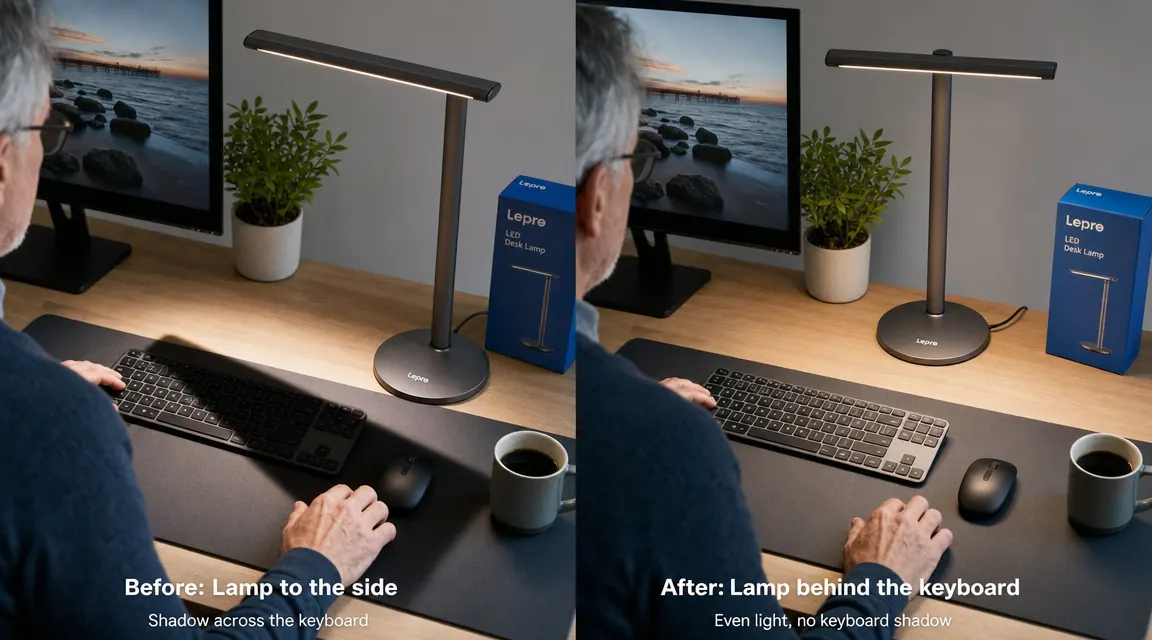
The most common misuse: the lamp placed to the right of the monitor and aimed sideways across the keyboard. This creates a hard shadow behind every key on the far side and produces specular glare on the monitor if the head is even slightly too high. A task lamp belongs behind and slightly to the left of the work surface, aimed forward and down, so the light falls parallel to your line of sight rather than crossing it. For right-handed people, the rear-left desk corner is the correct position. Head above and forward of your eyes, not beside them.
Set up correctly, the Lepro throws an even field across the keyboard and a notebook with no hot spots. Set up wrong, it creates exactly the eye fatigue you bought it to fix. For placement specifics and ambient-to-task light ratios, my piece on how to light a home office without screen glare walks through the full setup. The lamp is only half the answer.
What I Liked
- Brushed aluminum build that does not flex, creak, or show joint wear after months of daily repositioning
- Flicker-free dimming confirmed at all five brightness levels via slow-motion video testing
- Five distinct color temperature steps from 2700K warm white to 6500K daylight, all genuinely useful in practice
- Weighted metal base stays planted when you reposition the arm, no sliding or tipping
- Even light spread illuminates keyboard and a notebook simultaneously without hot spots or edge falloff
- Under $30, which makes comparable plastic lamps with fewer modes look overpriced by comparison
Where It Falls Short
- Elbow joint is stiff out of the box with a snap-threshold that feels like a defect until the friction-hinge design is understood
- No setting memory: restarts at 4000K mid-brightness every cycle regardless of last-used setting
- Power cable at 59 inches is too short for deep desks with outlets behind the wall, requiring a routing workaround
- Lamp head joint is looser than the arm joints and will tilt if the desk is bumped during work
- Lux output at 18 inches on mid-brightness is marginal for reading fine print or close detail tasks

Who This Is For
The Lepro is the right buy if you sit at a home desk for four or more hours a day, your eyes feel strained by mid-afternoon, and you want something made from real materials at a price that does not require a second thought. The five color modes are not extras. They are the feature that separates this lamp from the $15 plastic lamp on the next shelf. If you work in the morning and the evening in the same space, the ability to shift from neutral white to warm amber is the difference between a lamp and a tool.
It also works well for reading, crafts, detail work, and anything requiring good contrast and reasonably accurate color rendering. At 6500K on full brightness, color accuracy is sufficient for paint swatches, thread matching, or reading fine print in technical drawings. At this price, that range of usefulness is not common.
Who Should Skip It
If you want a monitor-mounted light bar rather than a desk lamp with a base footprint, the Lepro is the wrong category. Products like the BenQ ScreenBar mount on the monitor and light the desk from above. I compare the two approaches directly in the Lepro vs. BenQ ScreenBar piece if that is the actual decision you are working through. They solve different problems.
If you need a lamp that extends more than 20 inches out over a wide work surface, a large drafting table or a standing-height workbench, the Lepro arm is too short. You need a long-arm clamp lamp or a swing-arm floor lamp for that reach. And if setting memory is genuinely important to how you work, look at lamps with a recall feature before committing. A few exist at this price and the Lepro does not beat them on that single point.
Knowing the tradeoffs makes this an easy call. Under $30 for flicker-free dimming on a metal arm.
The elbow joint breaks in, the cable routes fine with a clip, and the startup default is a two-tap fix. What you get is metal construction, proven flicker-free dimming, and five usable color modes. Check today's price on Amazon and see where it sits.
Amazon Check Today's Price on Amazon →